Created Kotoba-inspired Discord bot to render pinyin for Chinese text
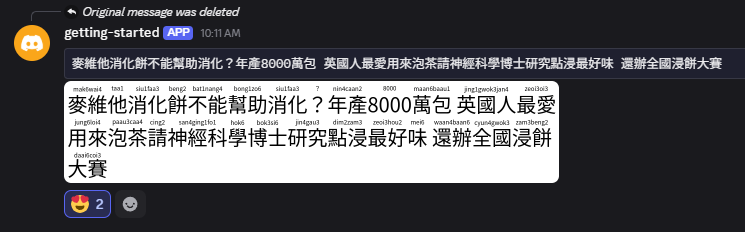
The Kotoba Discord bot has a useful command to take input Japanese text and render PNG images with furigana. Looking up furigana within Discord is convenient and has advantages like keeping a history of lookups, which is useful for review. Wouldn’t it be nice to do the same thing for Chinese? I repurposed the API supporting my pinyin lookup webapp and connected it with another API that reuses Kotoba’s furigana rendering library to overlay pinyin on Chinese text. I then hook up this API with a slash command provided by my Discord bot, which kicks off a job to render the image and post it back to the channel by webhook message. The bot and supporting backend all run serverless, and I learned a lot by building on AWS Lambda and Cloudflare Workers.
Figured out API Gateway streaming with Lambda
AWS Lambda is a good option to build backend APIs, is made pretty accessible with SAM, and with Lambda Web Adapter acting as a reverse proxy to your app server, you can just write in your framework of choice knowing that it will just work on Lambda without worrying about the details. However, the devil is in the details as you’d have to jump through hoops with Lambda Function URLs if you want to make use of response streaming e.g. for serving LLM tokens. As of November 2025, API Gateway supports response streaming and solves this issue, but while there are a number of configuration methods, setting this up with SAM was a bit of a mystery. To clear things up, I put together a starter SAM project that demonstrates a minimal template to set up a REST API with streaming endpoint handled by FastAPI. The project is a good starting point for building backend APIs. Here’s a link to the Github repository.
Created app to lookup pinyin and jyutping
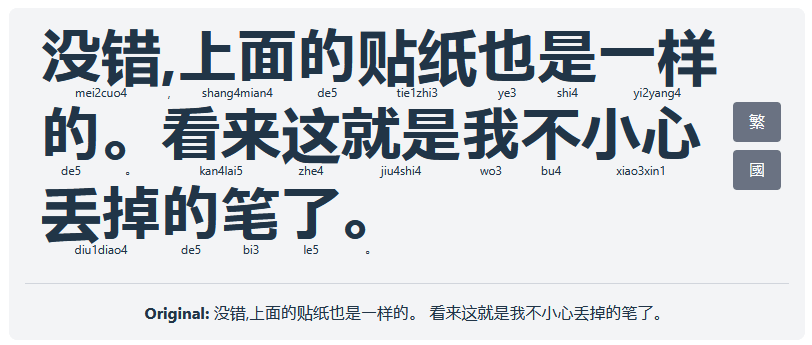
As a Chinese language learner, being able to look up Chinese words is essential, and while the resources available make it easier than ever, a lot of relevant information is fragmented and introduces friction in the learning process. I created a React app that lets you transliterate a snippet of Chinese text, breaking up the individual words and displaying the phonetic reading underneath each word as a reading aid. The app allows toggling between Mandarin Pinyin and Cantonese Jyutping readings. The app also allows toggling between traditional and simplified scripts. When combined with an OCR tool like Google Lens and a mouseover dictionary extension like Zhongwen, this app makes for a great reading aid. Try the app out here.
Discord App on Cloudflare
I went through Discord’s tutorial for building your first Discord app that has you complete a starter Express.js server to handle webhooks from your Discord server but doesn’t walk you through how you might deploy it.
I went through the exercise of deploying it to Cloudflare Worker and making the adjustments needed for it to work in that serverless environment.
I struggled with two issues moving to Cloudflare: one was how to persist game state, and another was how to properly make outgoing API requests.
After learning more about the Cloudflare serverless computing model and some of Cloudflare’s building blocks, I was able to solve my issues by rewriting the Discord app in a native Cloudflare handler.
I found Cloudflare’s CLI wrangler easy-to-use, and with the generous free tier, I’m looking forward to building more proof-of-concept-type projects on Cloudflare.
I made my code available on Github here.
Added a visitor counter
After setting up this Hugo site, I wanted to spruce it up a bit by bringing back a throwback from classic websites back in the day: a visitor counter. Below are some notes on that as I get more accustomed to working with Hugo.
The backend
I prepared a backend to handle the visitor count.
Making a request to the backend will increment and return the visitor count.
I hosted the backend on Google’s Cloud Run platform.
I chose this platform for the backend because it’s serverless and at this point would fall under the free tier of usage, i.e. cost me zero dollars.
Also, I wanted to go through the exercise of setting up a serverless backend.
I’ll make a separate post about the details later.
For now, all we need to know for this discussion is that the backend is accessible by a URL.
In order to make it available to frontend Javascript, I will put it in the DOM.
I decided to put it in a meta tag in the head of the HTML document.
The ananke theme has a predefined block that pulls in a partial file if it’s available, so I placed the following snippet in layouts/partials/head-additions.html:
Figuring Out Hugo
Here are some notes from setting up a basic Hugo site with the ananke theme.
I followed the official quickstart guide but had to figure out a few things along that way, which I make a note of below.
Theme setup as Hugo module
The quickstart has you setting the ananke theme up as a Git submodule, but apparently this is the old way of doing things. The new recommended way of installing themes is to set it up as a Hugo module. From a high level, you
Bitwise XOR of All Pairings
Problem
You have two arrays of non-negative integers nums1 and nums2. Let nums3 be the array of the XOR of all pairings between nums1 and nums2. Return the XOR of all integers in nums3.
Approach
The description is essentially one big XOR sum of XOR’d pairs, which makes me think this is an exercise in the properties of XOR. Since XOR is commutative, we can just ignore the fact that the numbers are paired and tally the overall frequency of each number. If the frequency is even, that number goes to 0, otherwise the number stays.