Created Kotoba-inspired Discord bot to render pinyin for Chinese text
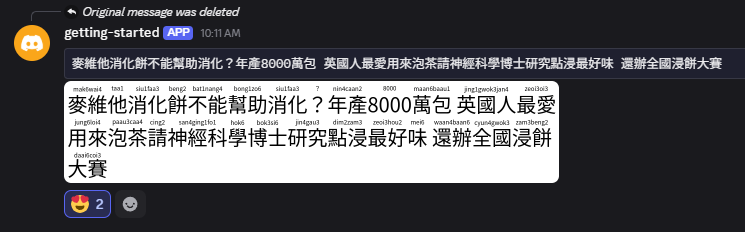
The Kotoba Discord bot has a useful command to take input Japanese text and render PNG images with furigana. Looking up furigana within Discord is convenient and has advantages like keeping a history of lookups, which is useful for review. Wouldn’t it be nice to do the same thing for Chinese? I repurposed the API supporting my pinyin lookup webapp and connected it with another API that reuses Kotoba’s furigana rendering library to overlay pinyin on Chinese text. I then hook up this API with a slash command provided by my Discord bot, which kicks off a job to render the image and post it back to the channel by webhook message. The bot and supporting backend all run serverless, and I learned a lot by building on AWS Lambda and Cloudflare Workers.
Kotoba furigana rendering
Here’s a schematic diagram of how Kotoba renders furigana:

Basically there are two steps:
- Analyze the text to produce the kanji/furigana (i.e. word/reading) pairs
- Render the kanji/furigana to PNG
I already have an API that produces pairs of Chinese characters and their pinyin/jyutping readings, so it seemed like a straightforward task to replace the analysis step and feed the data to the rendering step. While the render-furigana library was straightforward to use, it was less straightforward to get up and running on a serverless platform.
Cloudflare workers incompatible with node-canvas
I failed to run this snippet of code in a Cloudflare workers environment:
import renderFurigana from "render-furigana";

const kanjiFont = "40px NotoSansCJKjp";
const furiganaFont = "12px NotoSansCJKjp";
const demo = () => {
  const sampleData = {
    pinyin_by_words: [
      ["非常", "fei1chang2"],
      ["遺憾", "yi2han4"],
      ["我們", "wo3men5"],
      ["無法", "wu2fa3"],
      ["記錄", "ji4lu4"],
      ["您", "nin2"],
      ["的", "de5"],
      ["本次", "ben3ci4"],
      ["參與", "can1yu4"],
      ["。", "。"],
    ],
  };
  const preppedData = sampleData.pinyin_by_words.map((pair) => {
    return { kanji: pair[0], furigana: pair[1] };
  });
  return renderFurigana(preppedData, kanjiFont, furiganaFont);
};
I got ReferenceError: document is not defined.
After some searching, it seems that the Cloudflare environment, while increasingly compatible with standard Node.js, does not support node-canvas.
I gave up here and attempted it on AWS Lambda.
Custom font handling on AWS Lambda
I had better luck rendering images with the same code, but the fonts were missing in the output image:
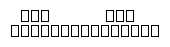
The AWS Lambda runtime environment is also minimal in its own way, and I needed to vendor my own font files and configure them if I wanted to use them. Based on this StackOverflow answer, I was able to install my font file.
- Place font file in
${code_uri}/fonts/ - Create font config file
${code_uri}/fonts/fonts.confwith the following content:
<?xml version="1.0"?>
<!DOCTYPE fontconfig SYSTEM "fonts.dtd">
<fontconfig>
  <dir>/var/task/fonts/</dir>
  <cachedir>/tmp/fonts-cache/</cachedir>
  <config></config>
</fontconfig>
- Set the
FONTCONFIG_PATHenvironment variable for your Lambda function to/var/task/fonts.- The
/var/taskdirectory seems to be where Lambda places your zipped code, so this will point to thefontsfolder you include with your code.
- The
So my Lambda code has this layout:
├── src
│   ├── app.mjs
│   ├── fonts
│   │   ├── NotoSansCJKjp-Regular.otf
│   │   ├── README.md
│   │   └── fonts.conf
│   ├── package-lock.json
│   ├── package.json
And without modification, the JS code above is able to pick up the font and render properly.
Linking up with Discord bot
At this point, it’s a straightforward task of linking up the API to my bot’s slash command, but there were two things I had to figure out:
- How do I attach the PNG image response to my Discord webhook message?
- How can I handle the PNG image response in the background?
Attaching PNG to message
Basically I needed to prepare the message contents as multipart form data.
async function postMessage(text, url, token, appId) {
  const response = await fetch(url);
  const pngBlob = await response.blob();

  const formData = new FormData();
  const payload = {
    content: `\`\`\`${text}\`\`\``,
    attachments: [
      {
        filename: "image.png",
        id: 0,
      },
    ],
  };
  formData.append("payload_json", JSON.stringify(payload));
  formData.append("files[0]", pngBlob, "image.png");

  const endpoint = `https://discord.com/api/v10/webhooks/${appId}/${token}`;
  await fetch(endpoint, {
    method: "POST",
    body: formData,
    headers: {
      Authorization: `Bot ${process.env.DISCORD_TOKEN}`,
      "User-Agent":
        "DiscordBot (https://github.com/discord/discord-example-app, 1.0.0)",
    },
  });
}
Using Cloudflare queue for background processing
Since I didn’t want my slash command to block for the duration of the AWS Lambda’s cold start, I enqueued a message on a Cloudflare queue and responded with an ephemeral message in the interim.
PINYIN_LOOKUPS is the binding to the Cloudflare queue that stores messages corresponding to invocations of my bot’s slash command and is specified in the wrangler.toml config file.
  const urlOptions = new URLSearchParams(options);
  await env.PINYIN_LOOKUPS.send({
    type: "pinyin",
    data: {
      text: inputOptions.text,
      url: `https://path/to/my/pinyin-api?${urlOptions.toString()}`,
      token: body.token,
    },
  });
The enqueued message gets processed by a Cloudflare consumer subscribed to the queue. The consumer takes the message and takes its time fetching, attaching, and posting the message back to discord.
export default {
  // ...
  async queue(batch, env, ctx) {
    for (const message of batch.messages) {
      if (message.body.type === "pinyin") {
        await postMessage(
          message.body.data.text,
          message.body.data.url,
          message.body.data.token,
          env.APP_ID,
        );
      }
    }
  }
Closing Thoughts
Building microservices and stringing them together to build a Discord bot was a fun and educational experience. The fact that they are small and self-contained makes each API easy to reason about in isolation, though I can imagine what a headache it could be to troubleshoot an app with a large dependency graph of microservices.
I am very happy about how little it costs to build toy side projects like this.
Building on Cloudflare does have its limitations, but compared to AWS Lambda, deployment is dead simple and the developer experience is amazing.
At the moment, my bot is just a proof of concept for my personal Discord channel, but I do hope to publish a public version that can be used by everyone. I haven’t really thought about the things I need to think about to support widespread usage. One thing that I wonder about is how to improve the cold start problem in the text analysis part of my backend. Maybe that problem just goes away given sufficient traffic to keep the Lambda warm, but maybe at that point it becomes more economical to provision some dedicated compute. For now, I’ll just enjoy what I made in my own channel.